Your Body. In 3D.
Your Health. In Sight.
An all-in-one platform that combines interactive 3D human anatomy, AI-powered body scanning, and smart health insights to help you understand your body, track your health, and take control of your well-being.
3D model built from BodyParts3D medical scans. Hover any body part or organ to name it. Click a body part for its workouts, or any of the 23 organs for its 3D tour inside and out.

Meet Aria. She speaks your language.
Talk or write to her, show her a photo or your camera, and get possible causes, treatment options and a report for your doctor. Write or speak in any language and she answers in it.

Your scan, step by step
Choose the body area, then open the camera or upload a photo.
Aria is an AI for education and guidance, not a doctor, and a photo cannot show what is inside the body. In an emergency call 112.
Explore the body. Part by part.
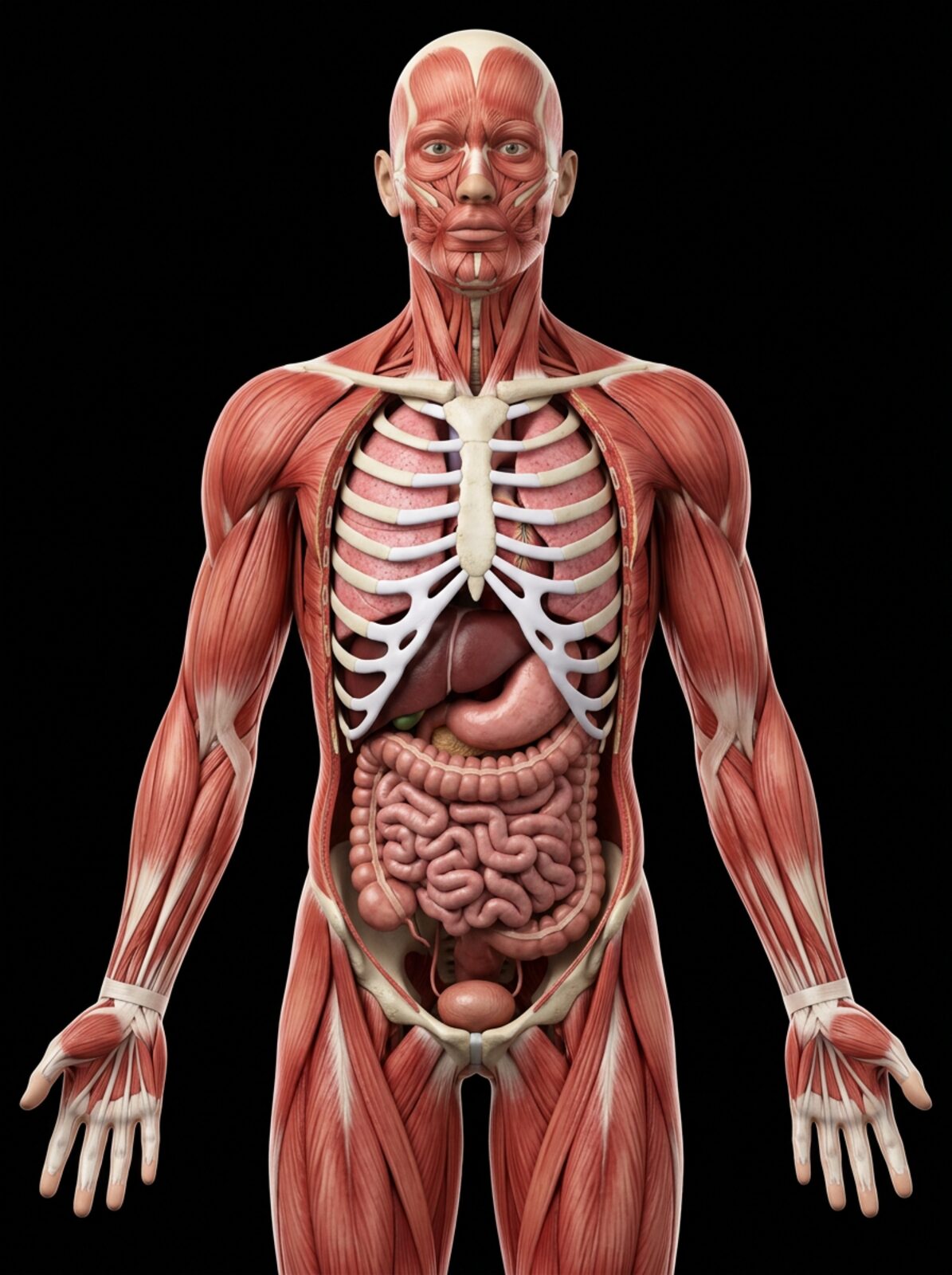
Tap a point to explore · tap again for the 3D lesson
Drag to turn 360° · scroll to zoom · click a body part for its workouts
Drag to rotate in 3D · scroll to zoom
Human teeth & jaws in 3D
▶ plays the narrated 3D tour · drag to turn 360° · scroll or pinch to zoom · click any label to see and hear that part
Each set loops for 60 seconds · drag to rotate 360° · orange = muscles working · 📷 Camera coach: stand inside the oval and copy the trainer. The set timer runs only while you are inside the oval (it turns green). Video stays on your device.
Whole-body bodybuilding. Coached by your camera.
Pick a male or female bodybuilding programme. A 3D trainer shows every exercise, and the camera coach traces your body live, counts your reps and tells you straight away when your form slips, so you do each workout right.
Generate my workout & diet plan
Enter your height and weight and choose what you want: build muscle, lean muscle or body lifting. Get a weekly workout plan with daily calories, protein, carbs, fat, water, vitamins and minerals. Save it to My Progress and print it.
Body tracking runs on your device. Video is never uploaded or stored. The camera view stays still: stand inside the dashed oval (it turns green when your whole body is inside). Cyan lines = your traced body, red = fix this part, the bar on the right = range of motion.
3D trainer · drag to rotate · orange = muscles working
Physio workouts · body parts
Pick a body part from head to feet. Every physiotherapy exercise is shown by the 3D trainer you can turn through 360°, and Aria, the physio coach, explains how to do it by voice or text in any language.
Warm up first and stop if you feel sharp pain, dizziness or chest pain. If you have an injury, heart problem or are pregnant, check with a doctor before starting a new programme.
Scan your body and skin. Get clear results.
Choose a scan. The full-body scan reads your whole outline from head to feet and works out body fat, muscle, weight, measurements and posture. The face scan checks your skin for pimples and other problems and gives you a cream and oil plan. For your teeth, use the Teeth Scanner.
Enter your height, then start the tracker and stand 2–3 m from the camera so your whole body is in view.
Tracking runs on your device. Video is never uploaded or stored.
1. About you
Height sets the scale for every measurement. The scan estimates your weight and muscle mass from your body volume. If you know them from a scale, type them in for the most accurate result.
2. Scan
- Front view. Face the camera, feet hip-width apart, arms held out 30–45° from your sides.
- Side view. Turn 90°, stand tall with your arms hanging straight down.
- Results. Body fat, muscle, weight, measurements and posture appear below.
Wear tight clothes, stand in front of a plain wall in good light. Each view is captured automatically when you hold still.
Your results appear here after the scan.
Skin photo log · keep dated photos of a mole, rash or wound to show your doctor
A phone camera cannot see inside the body or diagnose disease. For AI analysis of a photo, ask Aria, the AI assistant.
1. Choose the area
No area selected
2. Capture
Scan history
Face tracking runs on your device. Only the close-up photos are sent to the AI for checking, and they are not stored on our server.
1. About you
Tick anything you notice (optional):
2. Scan
Scan your teeth. See every problem in 3D.
Put your mouth in the oval and the camera takes five guided photos: front, both sides, upper and lower teeth. Or upload your own photos. The AI checks every tooth for holes, early decay, plaque, tartar, gum problems, cracks and more. It then shows each problem on a 3D model of your teeth with its treatment, and tells you when to see a dentist.
Camera picture not good enough? Press 📸 Take photo now when your mouth is in the oval, or take sharp photos with your phone’s camera app in bright light and press ⬆ Upload teeth photos.
⚠ Some photos are dark or blurred, so results may be less exact. Retake them or upload clearer photos.
Mouth tracking runs on your device. Only the photos are sent to the AI for checking, and they are deleted as soon as the check is done.
1. About you
Tick anything you notice (optional):
2. Scan
Brush first if you can. Use bright light: face a window, or use the rear camera with 💡 Light. Hold the phone 15–25 cm from your mouth. Each photo is taken automatically when your mouth fits the oval and you hold still.
Your real body. Tracked by you.
Every organ in this 3D body is coloured by what you measure and log: pulse, blood pressure, oxygen, breathing, sleep, mood, water, digestion, blood sugar, steps and pain. Nothing is made up. If you haven’t logged something, it shows as not tracked. Sign in on My Progress to keep it on every device.
Body systems
Check your pulse with your iPhone. Watch your body work live.
Put your fingertip on the iPhone’s rear camera to measure your real pulse, log your blood pressure, then start a ride, run or workout. The 3D body is built piece by piece and runs live: the heart beats with your pulse, the pressure wave races down every artery (the PulseChain), the lungs breathe and the kidneys filter, all changing with your effort.
Each heartbeat sends a pressure wave along the arteries. It reaches the neck first and the feet last; stiffer arteries (older age, high blood pressure) and harder effort make it travel faster. The chain below shows your last beats with the time between them; healthy hearts vary a little from beat to beat.
Values come from standard exercise physiology, scaled to your age, sex, weight, resting pulse and cuff reading. They show how a typical body responds, not lab measurements of yours.
All body parts
1. Check your pulse with your iPhone
Rest for a minute first. Then press start and cover the rear camera and the light with one fingertip. Press lightly and keep still for 30 seconds.
2. Activity · cycling · workout
Sensors for live heart rate while you ride
Works with Bluetooth chest straps and armbands (Polar, Garmin, Wahoo and others) and bike power or speed/cadence sensors. You can’t hold a finger on the camera while riding, so pair a strap for a live pulse; without one, check your pulse with the camera before and right after your ride and the model fills in between.
On iPhone, Safari and Chrome don’t allow Bluetooth on websites. Open 3ddoctor.org in the free Bluefy browser to pair a strap, or use Chrome on Android or a computer.
3. Blood pressure
An iPhone camera cannot measure blood pressure accurately, so no app should claim to. Use an upper-arm cuff: sit for 5 minutes, back supported, arm at heart level, no talking. The simulator uses your latest reading to show how your pressure changes with exercise.
4. About you
Max heart rate (208 − 0.7 × age): bpm. A good camera check while resting updates your resting pulse.
Your account, results and reports. All in one place.
Sign in and everything is kept in your own account: body weight, before & after photos, your workout & diet plans, every body, face, teeth and workout scan report, Aria’s reports and your medical reports. Each person only sees their own results, on any device.
Photos are stored privately in your account. Only you and the 3DDoctor owner can see them.
Scan & workout reports
Medical reports
Keep your medical reports in your account and check lab values against the ranges printed on them.
Upload a report
PDF, JPG or PNG, up to 5 MB.
Check lab values
Paste lines such as “Hemoglobin 11.2 g/dL (12.0-15.5)”. Results are compared with the range printed on your own report.
Health notes
Your data
Every client. Every rep. Every kilo.
See each client’s workouts, body weight, before & after photos and goals, and leave them a coaching note.
About 3DDoctor
An educational health platform to explore your body in 3D, scan it with AI, train with a camera coach and follow your progress.
What you can do
- 3D Anatomy · turn a real 3D human through 360° and open any body part or organ.
- AI Assistant · talk or write to Aria in any language and get a printable report for your doctor.
- Workout · male and female programmes with a 3D trainer and a camera coach that counts reps and checks form, plus a workout & diet plan generator with calories, protein and vitamins.
- AI Body Scanner · body, face & skin scans with results and a care plan.
- Teeth Scanner · guided camera or uploaded photos, a tooth-by-tooth AI check, problems shown on 3D teeth with their treatment.
- My Progress · your own account with every scan report, workout & diet plans, medical reports, body weight and before & after photos.
Your privacy
- The camera is processed on your device. Live video is never uploaded or recorded.
- Without an account, your scans, reports and notes stay only in this browser.
- With an account, your progress and photos are stored privately. Only you and your 3DDoctor coach can see them.
- Photos and messages sent to Aria or the AI scanner are used only to answer you and are not kept on our server.
- We do not sell or share your data. You can export or delete it at any time in My Progress.
Security
- The site runs only over encrypted HTTPS.
- Passwords are handled by a secure sign-in service and never stored by 3DDoctor.
- Every account request is checked on the server, so no one can open another person’s data or photos.
Contact
Questions about your plan, feedback or a privacy request? Email or call us, or send a message below.
Credits: body and face tracking by MediaPipe (Google, Apache 2.0). 3D anatomy from BodyParts3D, © The Database Center for Life Science, CC Attribution-Share Alike 2.1 Japan.